Lesson: PC ROOM / Tablet Document App: PowerPoint
Scenario: The students are working on preparing for and giving speeches using graphs and surveys. In these lessons you plan to prompt the students on how prepare for and give a speech with the provided materials*.
Survey Presentation: PechaKucha
8:45-8:50 Step 1: Return the worksheet to the students. See the textbook example:
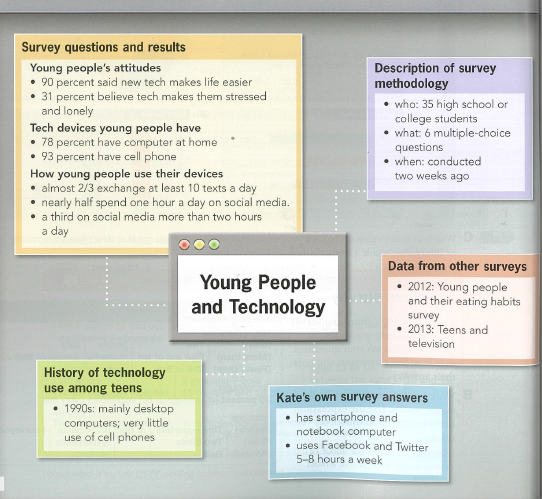
8:50-9:00 Step 2: Return the worksheet to the students. Explain the common strengths and main weaknesses. Explain the language on the board.
9:00-9:10 Step 3: Read your corrections. Do you have any questions? Answer and explain.
9:10-9:15 Step 4: Read your survey (independent).
9:15-9:25 Step 6: In this activity, the teacher will explain to you “How to make your presentation using PowerPoint. Please listen and watch for 10 minutes. Click on the link below.
9:35-9:50 Step 7: Please begin by downloading the template. If you have any questions ask your group members, or ask the teacher.
9:50-10:00 Step 8: Please stop making slides now. Everyone take turns and show their PowerPoint slides to your group members. Teacher walk around and supports the students.
10:00-10:10 Step 9: The teacher reviews the lesson. Final class discussion.
10:10-10:15 Step 10: Homework and Close;
Homework:
- finish your slides;
- practice reading your text, and check the time;
- before the next class look at the score card (Rubric) link