Category: FallSemmester2
Audio Recording
Aim: To submit an audio recording of your speech (not video).
Aim: To submit an audio recording of your speech (not video). You can use LINE voice memo (easy – click on the microphone to start recording, and un-click to stop recording (See screenshot), or an application (voice record app).

Method: To effectively record and submit your speech by using the following methods:
PowerPoint: To divide your information into categories and record (See example below). It is more effective to group data (information), however you can select to record 1 file, two files, three files – the choice is yours. Example:
- Category 1: Introduction; Reason; Importance
- Category 2: Description and Main Point 1
- Category 3: Other Main Points
Example LINE upload screenshot – total time 90seconds:
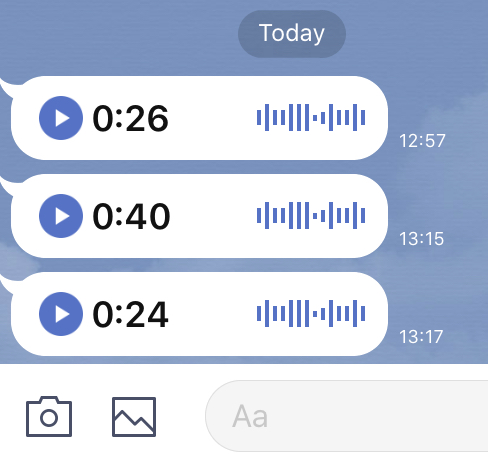
Upload Process: this process requires you to record your speech (audio) and upload your files to the teacher in LINE. However there is one small problem. “In the case of students using smartphones and access to the university WIFI, interconnect ability may result in some issues that result in poor performance .” (2020). Therefore The following time schedule will be followed:
- 13:00 – 13:30 Review work and prepare
- 13:30 – 13:45 Recording Time A (there will be no talking / discussion in class – only recording)
- 13:45 – 14:10 Review work and prepare
- 14:10 – 14:25 Recording Time B (there will be no talking / discussion in class – only recording).
- Complete lesson – if you cannot record and upload in the lesson please do for homework:)
Company Profile
Aim 1: To begin thinking about about work-life and research a company or organization:
- Japanese Company
- Small business
- Government office
- Organization or NPO (Non Profit Organization)
Method: To research the internet and record information. Select 1 website, which is informative, and report on the information displayed in the website
Procedure: Using word document write a one page report (in your own words) about the information and follow the requirements:
- Page Title: name
- Short introduction: details about the company or organization, and history
- Main information given in Website
- Current: news / topics / issues / plans /
- Your opinion
Word document format:
- Title: text bold; centered; 14pt
- Main text 1.5 line spacing; left justified or page full width justified; text 12pt
- space between title and each paragraph of information
Aim 2: To prepare a speech to introduce your company or organization
Method: To evaluate the company or organization based on the information given, and additional research, to decide if you would like to work there or not.
eBlog-Topic impression
Aim: to practice using the eBlog-text messaging for assignment work.
Method: use your smartphone to submit schoolwork
Activity: Answer the question
Question: What did you learn about your topic today. Write about 50words giving your ideas, and include your opinion about your topic.