You can make improvements by going back to the video, taking more FOI in your research slide, changing your presentation content and continuing the self-evaluation process. This is made up of many processes and is an Activity Cycle
Category: Activity
Transcribe 1 and 2
Aim 1: Is to transcribe your speech; this means to listen to your video recording and type the exact words. Record as many lines: Time / Script you want to.
Objective: To create a final transcribe (see attached document) in word. Please submit as a PDF in LINE, by next class.
Submission Guidelines by LINE
- Audio Recording
- 4 speech slides – PDF
- Transcribe word document – PDF
- Transcribe (90second speech) word document – PDF See example below:

Aim 2: Repeat the previous audio activity and submit with YouTube video
Video Conditions: Follow these requirements
- Record in the privacy of your own home (no mask)
- Center your face-shot
- Create name: My Transcribe
- Select Unlisted
- Practice & Repeat – upload when you are satisfied with your speech (not the first time)
Final Submission Outline: Complete the following submissions in LINE
- YouTube URL
- Transcribe PDF
Student Example
Five reasons why I like this example for researching media Source information – YouTube videos
- Good selection of videos
- Description is easy to understand
- FOI – are varied (different) not too lengthy; remember you can go back to the video for any information you need later
- Short and concise recorded information – note taking
- Time is recorded
Compile a Speech
Review: You have prepared the current Research PowerPoint with two video sources from YouTube, based on a sport topic.
- Title of Video 1 slide
- Short description of the event slide – introduction
- FOI slides – as many slides as you need (max 7)
- Reference slide – copy and past the video URL
- Title of Video 2 slide
- Short description of the event slide – introduction
- FOI slides – as many slides as you need (max 7)
- Reference slide – copy and past the video URL
Activity Objective: The next process is to Compile Speech PowerPoint – this is a very important skill to learn.
Slides (1 to 4) and information you will need to prepare:
- New Title & Combined Description: based on the content you use (make last)
- Content A: select FOI
- Content B: select FOI
- Conclusion Slide
Speaking Procedure: you only have 90seconds and 4 slides (no pictures only text) so follow the below steps as before:
- Reading text is black
- Highlight the speech text in blue
- Categorize your content; (1)Title & Description; (2)Content A; (3)Content B; (4)Conclusion – therefore 4 audio files (total 90 seconds)
Content Process: How to select and use the content you have. You can choose to present the best way possible – so experiment different ways;
- Select Content A (video 1) and record
- Select Content B (video 2) and record
- OR combine (video 1 & 2) Content A; and combine (video 1 & 2) Content B
Self Evaluate – Rubric Procedure: The score pane outlines least (1) to maximum score (between 5 to 10). When we use a rubric in an activity to improve our schoolwork, please follow these rules:
- a score of 1 = something not done (yet)
- a score of 2 = something done incorrectly
- a score of 3 = weak point – needs more work
- other scores = strengths and do not need more work
Audio Recording
Aim: To submit an audio recording of your speech (not video).
Aim: To submit an audio recording of your speech (not video). You can use LINE voice memo (easy – click on the microphone to start recording, and un-click to stop recording (See screenshot), or an application (voice record app).

Method: To effectively record and submit your speech by using the following methods:
PowerPoint: To divide your information into categories and record (See example below). It is more effective to group data (information), however you can select to record 1 file, two files, three files – the choice is yours. Example:
- Category 1: Introduction; Reason; Importance
- Category 2: Description and Main Point 1
- Category 3: Other Main Points
Example LINE upload screenshot – total time 90seconds:
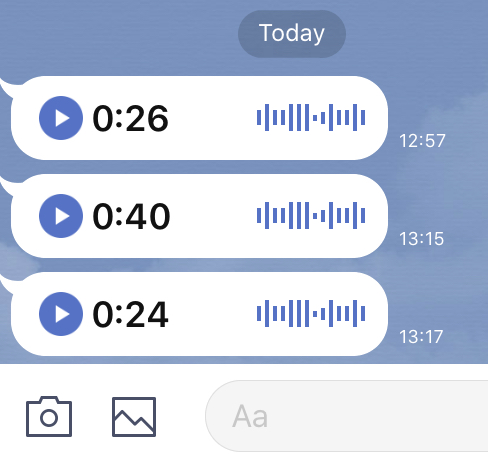
Upload Process: this process requires you to record your speech (audio) and upload your files to the teacher in LINE. However there is one small problem. “In the case of students using smartphones and access to the university WIFI, interconnect ability may result in some issues that result in poor performance .” (2020). Therefore The following time schedule will be followed:
- 13:00 – 13:30 Review work and prepare
- 13:30 – 13:45 Recording Time A (there will be no talking / discussion in class – only recording)
- 13:45 – 14:10 Review work and prepare
- 14:10 – 14:25 Recording Time B (there will be no talking / discussion in class – only recording).
- Complete lesson – if you cannot record and upload in the lesson please do for homework:)
Company Profile
Aim 1: To begin thinking about about work-life and research a company or organization:
- Japanese Company
- Small business
- Government office
- Organization or NPO (Non Profit Organization)
Method: To research the internet and record information. Select 1 website, which is informative, and report on the information displayed in the website
Procedure: Using word document write a one page report (in your own words) about the information and follow the requirements:
- Page Title: name
- Short introduction: details about the company or organization, and history
- Main information given in Website
- Current: news / topics / issues / plans /
- Your opinion
Word document format:
- Title: text bold; centered; 14pt
- Main text 1.5 line spacing; left justified or page full width justified; text 12pt
- space between title and each paragraph of information
Aim 2: To prepare a speech to introduce your company or organization
Method: To evaluate the company or organization based on the information given, and additional research, to decide if you would like to work there or not.
Protected: Research pptx
eBlog-Topic impression
Aim: to practice using the eBlog-text messaging for assignment work.
Method: use your smartphone to submit schoolwork
Activity: Answer the question
Question: What did you learn about your topic today. Write about 50words giving your ideas, and include your opinion about your topic.
Finals
August 12th, by 8:10pm: To complete A) Speaking Task, and B) eBlog Short Essay Review
Makeup Finals: If you are sick, or if you have trouble with the WIFI or internet, or device problems please tell your teacher. Makeup is scheduled for Thursday or Friday.
A) speaking Task
Objective: In this activity please prepare short answers to each question.
Method: Record using audio on you smartphone.
Answer Strategy: There is an important skill to giving short answers. Please read the steps below: Each answer should be 10 seconds (only).
- Step 1. First, give a short answer to the question. For example, Yes, No, Maybe, I think so, I am not sure…
- Step 2. Next, then provide some information about what you know, or what you think, or research the internet for some information.
Question List: Read the questions below
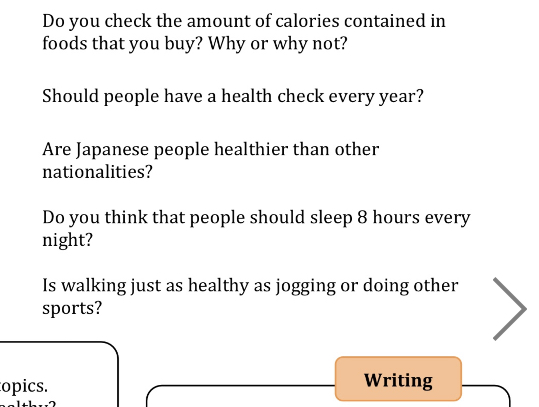
Submit: submit your answers in LINE. Please check the student examples:
Example 1: LINE audio upload

Example 2: Student audio example (question 4)
B) Short Essay Review
Objective: In this activity select a title and write 100 words
Method: eBlog (see below)
Titles: Select 1 title and write 100 words. Express your ideas and experiences and give examples.
- One of My Favorite Places
- An Important Possession to Me
- My favorite Childhood TV show or Movie or Animation
- My Diet Habits
Finals – August 5th and 12th
Objective: Final submission and assignment
- PDF – Cooking Instructions: email
- Presentation (A) Video draft: LINE – teacher will approve first; (B) Final Youtube video upload (in class 12th)
- eBlog – assignemnt August 12th – August 14th 5pm.