| How to use your CEFR feedback? Organization (1); Word Strategies (2); Sentence Structure Strategies (3) |
| 1. Organization: Plan to write a section of text and check the overall score, at any stage (beginning or end) of your writing, at different times of the week. |
| – focus on a specific section; introduction; main points; conclusion |
| – plan to do the assignments in two – three days (not only 1 time) |
| – you do not need to get a high score “result” every time; use as feedback to guide you |
| 2. Word Strategies: Ways to improve vocabulary / phrases by checking the CEFR level of difficulty |
| -repeat and listen to specific sections of the video – take additional notes |
| -add more key words to your video-key word list |
| -add phrases (small group of words) that give specific meaning |
| 3. Sentence Structure Strategies: evaluate your feedback score and think of ways to improve your sentence structure |
| -practice writing key words / phrases in your sentences |
| -reword video-content sentences (in your own words) |
| -focus on sentence types; giving Information; explaining something; giving your opinion |
Category: CEFR Analysis
Speech CEFR Upload 28/11 – 10 points
Aim: Presentation speech upload
Steps:
- copy your speech into a word document
- press full screen (top right)
- copy your full text: from word document to CEFR and click on Analyze
- take a screen-shot of your Result
- upload your screen-shot (picture)
- type 28/11 period 1 or period 2 (in the text box)
- write your details
- submit
CEFR Upload & PowerPoint Printout 28/11 – 10 points
Aim1: Printout your PowerPoint slides (x6 per page and submit to the teacher.
Aim2: CEFR Presentation slides upload
Steps:
- press full screen (top right)
- Go to print and select [ 6 slides per page ]
- CEFR and click on Analyze
- take a screen-shot of your Result
- upload your screen-shot (picture)
- type 28/11 period 1 or period 2 (in the text box)
- write your details
- submit
CEFR Test Activity
Aim: To evaluate our writing; improve our writing – by focusing on the use of key words (topic vocabulary or specialized vocabulary)
Procedure: Follow these steps
- Log into the CEFR system
- Type your Introduction of the topic video (Task 1)
- Click CEFR / Analyze
- Check your result. Can you improve your use of key words?
- Type and edit and improve your writing.
- Please do this exercise (repeat) 3 times in class today.
- Was this exercise helpful?
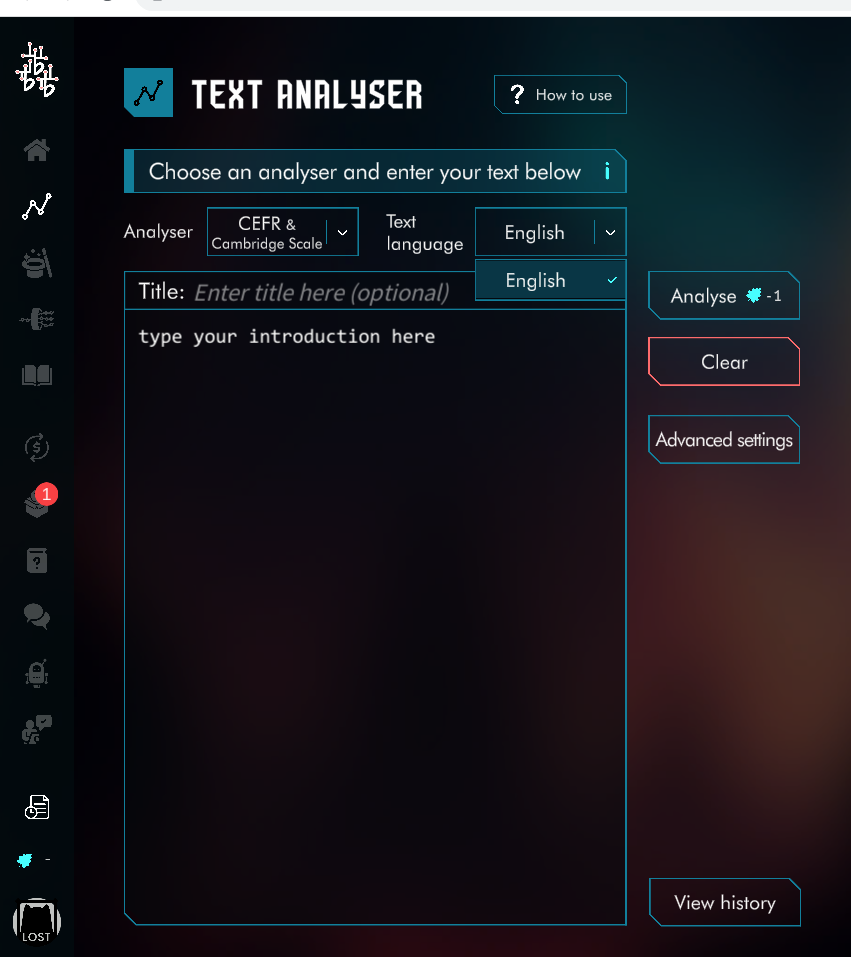
Learning how to convert word text into CEFR application
Aim: to evaluate your written text
Procedure: Copy your responses from the worksheet to the word document
Steps:
- Open a new word document and save as “Unit4_student number”
- Copy your first response (Task 1). You do not need a title. Type only your response.
- Save again.
- Click on the link: here
- Click on the first button text analyzer, in the center of your screen
- Select the analyzer type: drobox – number 2 ‘CEFR’
- Copy your text from your document -> or type direct into the text box
- Click on the button “Analyze” for your discourse feedback (text-evaluation)
- Please read