December 2nd – Poster Presenting

Procedure: File setup instructions

  • Open a new file word document
  • Title: Unit 5 Health & Well Being
  • Landscape Format
  • Table Layout
  • Headings: Task 1 Task 2 … Task 6

Template:

Objectives: To transition your information from your original document (PowerPoint – PP) to Poster (word document – WD). Follow these instructions;

  • Title / Headings – use the same from PP to WD
  • Graphics – pictures and diagrams; also use the same (PP -> WD)
  • Text information – change your text format from sentences to bullet point (the main words / phrases (not sentences)), for example;

Task 5: What are your good points and bad points about your health? Explain your answer. (30words)

Sentences: First, a) I always eat vegetables and fruit, b) I often cook fresh dishes, and c) I exercise every day. Unfortunately I only eat one time a day, usually dinner only. (30words)

Good points: (bullet points)

  • eat vegetables and fruit
  • fresh dishes
  • exercise

Bad points (bullet points)

  • dinner only

Submit: Save your document a) Word Document and b) as a PDF – to printout (when you finish). Give to me (teacher) in the next class
Speaking Criteria

speech card

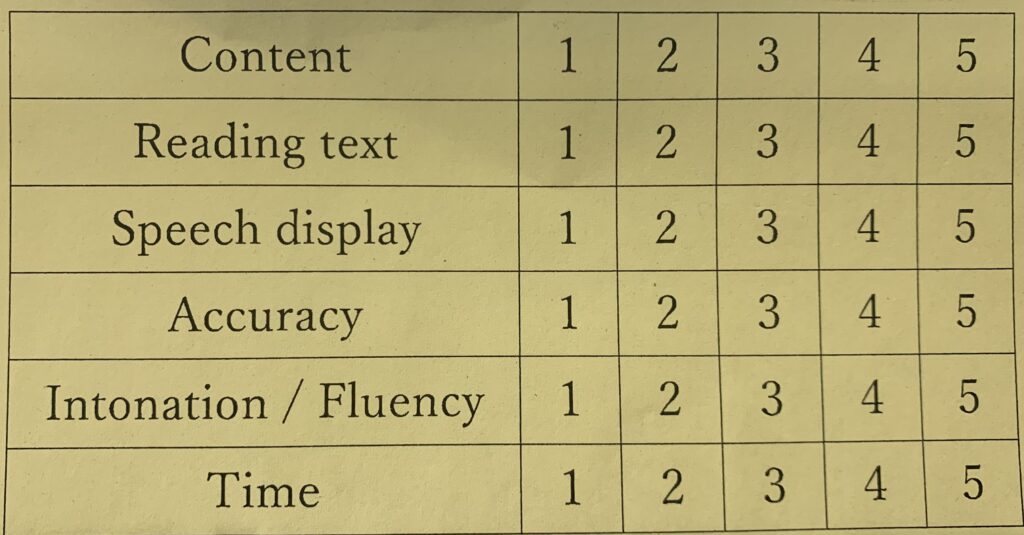
Aim: to use a speaking criteria (list & score) for a) practicing speeches and to b) receive a score from the teacher

List: this is a list of speaking and language objectives;

  • Content: the information about the topic. Topic information includes 1) video content and 2) your own ideas about the topic
  • Reading text: the slide information (PowerPoint): Title / Headings; information text / visuals ( pictures / diagrams )
  • Speech display: display means your speaking techniques and includes gestures
  • Accuracy: overall content and speaking ability – your aim is to make no mistakes
  • Intonation / Fluency: Intonation (1) is the pitch in your voice, also it is how you stress (highlight) key words; Fluency (2) is the pace of your speaking, and there are two parts – part 1 is speed (fast / slow), and part 2 is pausing.
  • Time: presenting in the right time frame (means a start and finish time), for example, 2 minutes means to finish between 1:55s to 2:05s (10 seconds)

Submission

Follow these steps

Steps:

  • 1. Print

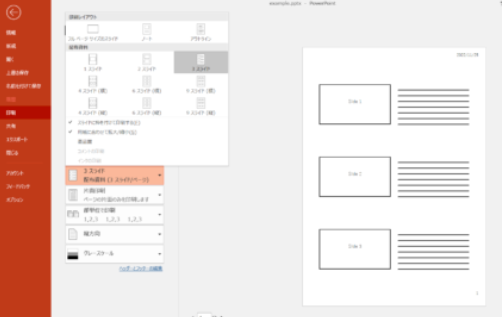
Print your PowerPoint slide (practice only) You do not need to submit to the teacher. Please take a photo of every slide and upload to LINE Group.

  • 2. Present

This class will use LINE to submit media.

– We need to make aegr# groups. For example Group 1: aegr1 (LINE group name)

– Present your speech: Record video and upload to your group – no mask.

  • 3. Take a photo of your speech card. Remember to look at the camera when you read your high light points!

Deadline: Video – In class / Outside class; PowerPoint photos In class / Outside class

Speaking Techniques

Objective: The teacher will demonstrate one way to present an effective speech

  • write your script on the speech card
  • highlight the key vocabulary / expressions
  • read your card, but look up at your audience and say your “key vocabulary / expressions”
  • stress these words
  • make eye contact with people as you say them
  • the teacher will give you class time for practice

Speaking: RCDE

Reducing Carbon Dioxide Emissions

Objective: talking about graphs:

link

Submission: Record a 1 minute video (file 1), submit your speech using the discourse method (take a photo) and submit in line (file 2):

File 1 video: prepare your speech and self record with your smartphone – hold your phone 1 arms length away from you; take your mask off; record in a quiet place; use earphones/mic

*practice with audio – and check

File 2 speech discourse: copy and paste your speech into the CEFR and take a screenshot or photo

Method: Make a short speech and include the below sections;

  1. Section 1: Introduction – 10 seconds
  2. Section 2: Body Information – 30 seconds *YOU have to decide what content you want to present; video / website / graph
  3. Section 3: Opinion – 10 seconds
  4. Section 4: Conclusion – 10 seconds

Assessment 5%

[1] Content 1% / [2] Time 1% / [3] Pronunciation 1% / [4] Fluency (speed) / [5] Teacher Impression 1%

Speaking: HI

Aim: To prepare a short speech presentation about your Problem and Solution

Method: To use a rubric or assessment criteria to plan and evaluate a speech and PowerPoint Presentation

Objective: To convert your short essay (writing exercise) and write a script using PowerPoint template:

Procedure: Use the template below to make your presentation. Open a new PowerPoint document and;

  • Write the title “Human Impact”
  • Save your document: HumanImpact.pptx
  • Back up your document on USB
  • Complete the template below

Presentation Template

Audio Submission: test conditions

How to submit?: Follow these steps. The teacher will show you how to record under test conditions!

  1. In class Practice
  2. Speaking objective 1: time limits for each slide
  3. Specking objective 2: pronunciation – please be clear and easy to understand:)
  4. record each slide using line audio record: click on the microphone and press record – unpress when you finish
  5. listen to your audio: if a) you want to repeat your speech then delete (you can delete many times is okay), or b) if your speech objectives are okay, then go to the next slide
  6. after you upload your 4 audio files – please leave the classroom (there is no homework)

For example:

Line me direct: 4 files

  1. 10 seconds
  2. 15 seconds
  3. 25 seconds
  4. 10 seconds

This is a LINE view of another assignment

TEST Instructions

Objective: Please record 4 speaking files – 25minutes

Method: Line me direct: 4 files

Objectives: 4 files in LINE audio recording

  1. 10 seconds: 11:17 – 11:25
  2. 15 seconds: 11:26 – 11:32
  3. 25 seconds: 11:33 – 11:39
  4. 10 seconds: 11:39 – 11:42

Speaking: ES for PC room

Aim: To prepare a short speech presentation about your Endangered Animal

Method: To use a rubric or assessment criteria to plan and evaluate a speech and PowerPoint Presentation

Objective: To convert your short paragraph (writing exercise) and write a script using PowerPoint template:

  • reading your paragraph is not a speech
  • you should change the paragraph for the speaking exercises
  • you have to use the time, for example 10s or 20s
  • the total time is 60seconds

Procedure: Use the template below to make your presentation. Open a new PowerPoint document and;

  • Write the title “My Endangered Animal: AnimalName”
  • Save your document: My Endangered Animal: AnimalName.pptx
  • Back up your document on USB; also print your PowerPoint
  • Complete the template below

Presentation Template